
Vehicle Application Tracking in Punjab: Know Exactly Where Your File Is
Every registration, transfer or duplicate card request in Punjab becomes a file inside the Excise department’s MTMIS system. Vehicle application tracking lets you open that file from home with two details from your receipt, and see which stage it has reached today.
Why Vehicle Application Tracking Saves You a Trip
Not long ago, the only way to ask "when will my card come?" was to queue at a Motor Registration Authority (MRA) counter. Today the same answer sits on your phone.
More importantly, the result tells you whether you need to act or simply wait. A spelling mistake, for example, shows up long before a wrong card lands at your door. Here is what the check covers, and what it leaves out.
| It shows you | It does not show you |
|---|---|
| The service your file belongs to | Your CNIC number or phone number |
| The stage your file has reached | The fees you paid |
| Whether that stage is done or pending | An exact delivery date for the card |
| Owner and father or husband name on file | Where the card is inside the post |
| Engine number, make and model year | Records from other provinces |
For payments and token tax, run a vehicle verification check instead. For the card's journey after printing, switch to GPO smart card tracking.
Four Reference Numbers Punjab Vehicle Owners Mix Up
Most failed searches come down to the wrong number in the wrong box. A single transfer can now involve four different references, and each one has its own job.
| Reference | Who issues it | What it looks like | Use it for |
|---|---|---|---|
| Application ID | Excise counter, facilitation centre or your dealer | A number printed on your receipt | Vehicle application tracking on this page |
| PSID | ePay Punjab, when you create a fee challan | A long numeric payment ID | Paying the registration or transfer fee |
| Pak ID Tracking ID and PIN | NADRA Pak ID app, after the seller's biometric step | Shown inside the app | Letting the buyer finish biometric verification |
| EXC tracking ID | Pakistan Post, when it books your card | EXC followed by eight digits | Following the card in the post |
For a typical used-vehicle transfer, the numbers appear roughly in this order.
How to Do Vehicle Application Tracking Online
The whole check takes less than a minute. Keep your receipt nearby, because you will copy two details from it.
- Find the application ID on your receipt. If a dealer registered the vehicle, ask the dealer for that receipt.
- Note the chassis number from the invoice, sale certificate, registration papers or the frame itself.
- Type both into the checker at the top of this page, then copy the characters from the security code image.
- Press Track application and read the four status fields from left to right.
Small Habits That Prevent "No Record Found"
- Type the application ID as digits only, with no spaces.
- Use capital letters for the chassis number, and keep any dash it contains.
- Never put the registration number in the application ID box.
- If the security code looks unclear, refresh it rather than guessing.
Using the Department's Own Page
The Excise department runs the same lookup on its official site. Overseas users often find that page slow or blocked, though, while the checker above works from any country.
Decoding Your Vehicle Application Tracking Result
Think of the result as four questions with four short answers. The sample below shows a used car transfer, using made-up details.
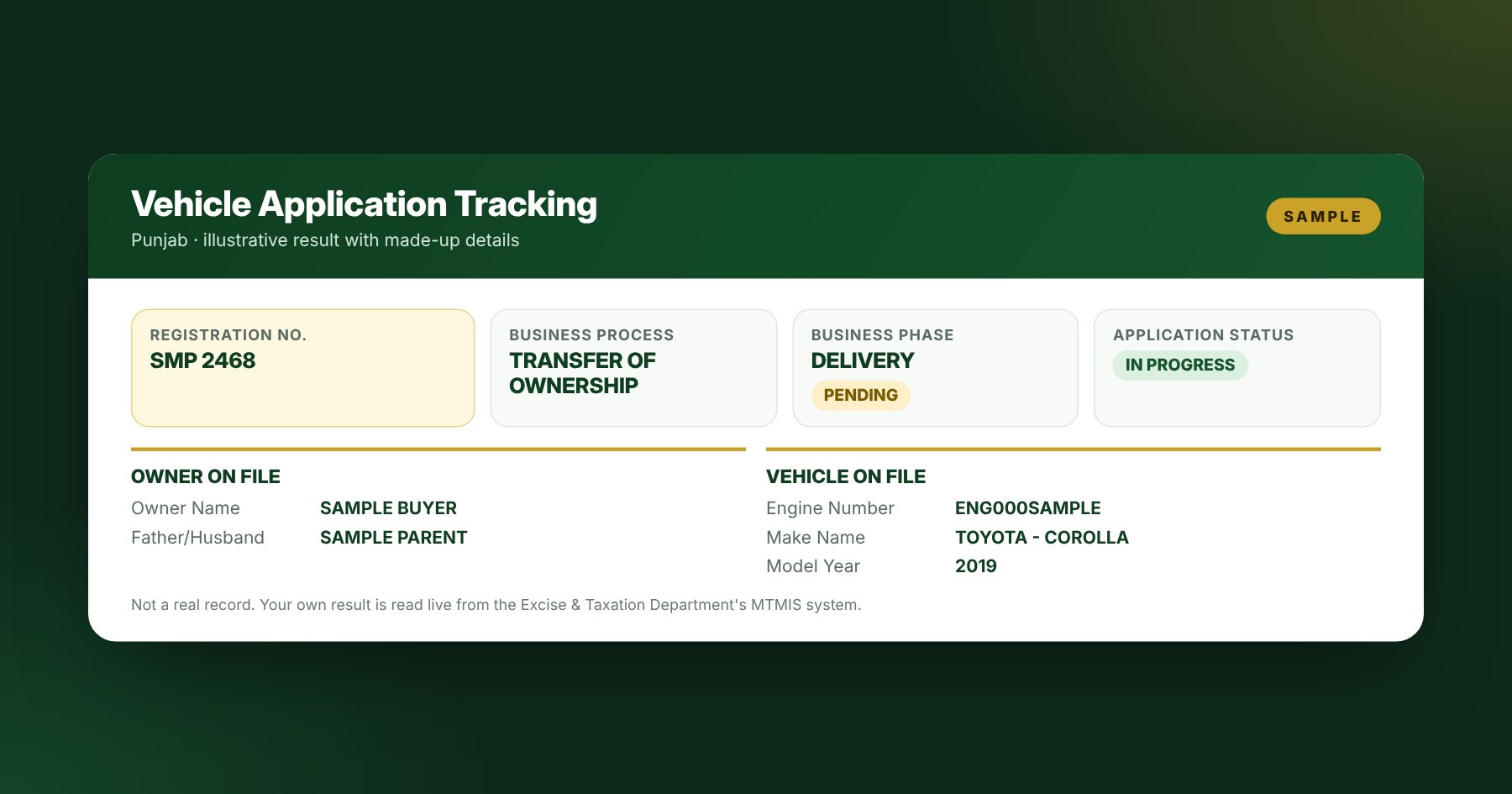
| Field | The question it answers | Sample value |
|---|---|---|
| Business Process | What did I apply for? | TRANSFER OF OWNERSHIP |
| Business Phase | Which stage is my file in? | DELIVERY |
| Business Phase Status | Is that stage finished? | PENDING |
| Application Status | Is the whole job done? | IN PROGRESS |
A New Registration Number After a 2025 Transfer
Since 1 September 2025, Punjab links registration numbers to the owner's CNIC. As a result, a seller usually keeps the old number, and the buyer receives a fresh one.
So if your transfer result shows a registration number that differs from the plate on the car, that is normally expected. Check it against your new paperwork rather than the old plate.
Owner and Vehicle Blocks: Your Proofreading Window
These lines are what will appear on your smart card. Compare each letter of the owner name and engine number with your CNIC and the vehicle.
Spot an error? Take your CNIC and receipt to the office that accepted the file as soon as possible. A correction before printing saves you the trouble of a duplicate card later.
What Your Vehicle Application Tracking Status Means
Each status points to a clear next move. Find the line that matches your result.
| If your result shows | It usually means | Your next move |
|---|---|---|
| IN PROGRESS | Someone at Excise still has work to do on the file | Check again once a week |
| DELIVERY with PENDING | The card is printed or about to enter the post | Wait a few days, then try GPO smart card tracking |
| DELIVERED | Excise has closed the delivery step | No card after two weeks? Contact Pakistan Post |
| No record found | A typo, or the file sits under another ID | Re-check both details, then ask the office |
| A transfer frozen for weeks | Often unpaid token tax, a missing paper or an unfinished biometric step | Call 1035 or visit your MRA office |
Real Situations, Clear Answers
Status tables only go so far. These are the cases readers ask us about most, with what we would do in each one.
You Bought a New Bike From a Dealer
Dealers usually register new vehicles through the Excise Dealer Vehicle Registration System (DVRS). Ask the dealer for the receipt with your application ID, then track the file after two or three working days.
You Bought a Used Car This Year
First, the buyer pays the transfer fee through ePay Punjab. Next, both parties verify in the NADRA Pak ID app, and then the documents go to Excise. Track the file once you have the receipt, and expect a new registration number on the result.
You Live Abroad and Family Handled the File
Ask your relative for a clear photo of the receipt and the chassis number. Because the checker on this page works worldwide, you can follow the file yourself without calling home every week.
Nothing Has Changed in a Month
Note your application ID and the exact status, then call the Excise helpline on 1035. If the line is busy, book a slot through the department's online appointment service and visit with your papers.
How Long Should Each Stage Take?
Times vary by district and season, so treat the figures below as a rule of thumb drawn from files we have followed. The right-hand column tells you when to start asking questions.
| Stage | Normal wait | Ask if it stalls beyond |
|---|---|---|
| Approval at the MRA | A few working days | Two weeks |
| Card printing in Lahore | Days after approval | Two weeks |
| Booking with Pakistan Post | Soon after printing | One week |
| Delivery to your door | Usually within two to four weeks in total | Five weeks overall |
Where to Get Help Beyond Vehicle Application Tracking
Choose the office that matches your problem. That way, you avoid being sent from one desk to another.
| You need to | Go to |
|---|---|
| Ask about a stuck or wrong file | Excise helpline 1035, or your MRA office |
| Book an office visit | Excise appointment portal |
| Pay a registration or transfer fee | ePay Punjab |
| Finish biometric verification | NADRA Pak ID app |
| Find a card that left Excise | GPO smart card tracking |
Papers to Carry for a Transfer Query
- Original CNIC of the buyer, and a copy of the seller's CNIC
- Receipt showing the application ID
- Transfer order and the original registration certificate or smart card
- Proof that token tax is up to date
Explore More Punjab Vehicle Guides
Vehicle Application Tracking FAQs
01Does vehicle application tracking work for every province?
No. This checker covers Punjab only. Islamabad, Sindh and Khyber Pakhtunkhwa run their own systems, which our province guides explain.
02Is the Pak ID Tracking ID the same as my application ID?
No. The Pak ID app creates its Tracking ID and PIN for the biometric step of a transfer. The application ID comes later, on the receipt Excise gives you.
03Can I use vehicle application tracking for a duplicate smart card?
Generally, yes. A duplicate card request is a separate application with its own receipt, so you follow it just like a registration or transfer.
04Why does my transfer show a different registration number?
Because Punjab now ties numbers to the owner's CNIC. After 1 September 2025, the buyer normally receives a new number while the seller keeps the old one.
05My file is new and vehicle application tracking finds nothing. Why?
Sometimes a fresh file takes a little while to appear online. Try again on the next working day before you assume something went wrong.
06Does vehicle application tracking show what I paid?
No. For the latest payment on a registered vehicle, use vehicle verification. For fee receipts, check your ePay Punjab history.
07Is it safe to enter my details here?
Yes. Your details travel to the official MTMIS portal through a secure relay server in Pakistan, and this website does not store them.
08Is mtmis.com.pk a government website?
No. We are an independent guide and are not part of the Excise department, NADRA or Pakistan Post. Only the department can change your record.
Track It Once, Then Get On With Your Day
A minute of vehicle application tracking replaces a morning in a queue. Check the four fields, proofread the owner details, and know which number belongs to which step. Then, when the card leaves Excise, hand over to GPO smart card tracking and let Pakistan Post do the rest.
Last reviewed: 10 October 2026. We base the field names, statuses and scenarios on live MTMIS results and real transfer files we have followed.
Disclaimer: mtmis.com.pk is run independently. It has no connection with the Excise, Taxation and Narcotics Control Department, NADRA or Pakistan Post. Please read our disclaimer and privacy policy.