
Smart Card Download Punjab | Vehicle E-Registration Card Online
Your vehicle’s paper registration book now has a modern replacement. The Punjab Excise, Taxation and Narcotics Control Department issues a smart card for every registered vehicle, plus a digital copy called the e-registration card. With smart card download Punjab, you save that card as a PDF on your phone in under a minute, free of charge.
E-Registration Card · Excise & Taxation Punjab
Download Your Vehicle Smart Card
Click Here to Download Smart CardOpens the official Excise portal, vrcentpunjab.com, in a new tab.
To download your Punjab vehicle smart card, open the official Excise e-registration portal at vrcentpunjab.com. Enter your vehicle registration number and chassis number, then press search. Check the details shown, and save the e-registration card as a PDF. The service is free and needs no account.
What Is a Vehicle Smart Card in Punjab?
The Punjab vehicle smart card is a chip-enabled registration card. It replaced the old registration book, and the Excise department issues it after a new registration or an ownership transfer. Think of it as your vehicle's identity card, whether you drive a car, a motorcycle or a commercial vehicle.
In January 2024, the department added a digital version, the e-registration card, which it called Punjab's first e-title document. It carries the same registration details, and you can download it whenever you need a copy.
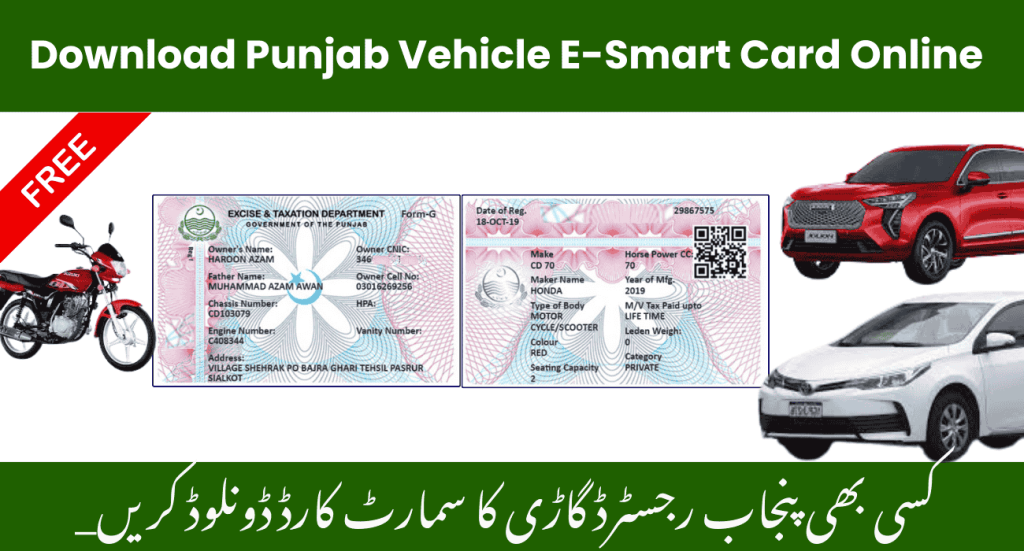
Each card brings together the key facts about your vehicle and its owner:
- Registration number and chassis number
- Owner's full name and address
- Engine number and manufacturing details
- Colour, make and model
- Registration date
- Token tax status
Because it comes from the department's own records, the card works as convenient proof of registration, for example at a traffic checkpoint. Still, carry the physical card for formal work such as a transfer or a sale. The original links to the Excise Smart Card portal remain the official source.
Why Download Your Smart Card Online?
Getting a copy of your registration once meant several trips to an Excise office, long queues and a stack of paperwork. The online download removes all of that, which is why more owners now keep a digital card on their phone.
| Benefit | What it means for you |
|---|---|
| Instant Access Anywhere, Anytime | Download the card in seconds from home, with no time off work for a simple copy |
| Always Available | The saved PDF opens on your phone even offline, so you never leave the papers at home |
| Environmentally Friendly | Less paper and fewer printed copies, a small step towards a greener Pakistan |
| Enhanced Security | It comes straight from the official Excise portal, so it is much harder to fake than a photocopy |
| Cost-Effective Solution | No fuel, parking or lost working hours, and the download itself costs nothing |
| Feature | E-registration card (PDF) | Physical smart card |
|---|---|---|
| Cost | Free download | Paid once at registration or transfer |
| How you get it | Download from the official portal | Delivered by Pakistan Post |
| Time to get it | Under a minute | Usually two to four weeks |
| Where you keep it | Phone, email or print-out | Wallet or glovebox |
| Best for | Quick proof and everyday checks | Formal work such as transfers and sales |
How to Download Smart Card Online in Punjab
The whole process takes less than a minute. Keep your registration papers nearby, because you need two details from them.
Step 1: Visit the Official Platform
Open the official e-registration portal, vrcentpunjab.com. Alternatively, go to excise.punjab.gov.pk and choose E-Registration Card under Services. The portal works on both mobile and desktop.
Step 2: Enter Vehicle Details
Type your vehicle registration number and chassis number in the search fields. Copy both exactly as they appear on your documents, including letters and digits.
Step 3: Verify Information
The portal shows the basic vehicle details on record. Check them carefully before you continue, so you download the right card.
Step 4: Download Your Smart Card
Save the e-registration card as a PDF. You can keep it on your phone or print it whenever you need a paper copy.
Step 5: Save and Share
Store the card on your smartphone, email it to yourself as a backup, or print a copy. Keeping it in more than one place means you always have it to hand.
Information Available on Punjab Excise Smart Card
The card holds the details that traffic police, insurers and buyers usually need to confirm. Here is what you will find.
Complete Vehicle Specifications
Make, model, engine capacity and body type, matching the department's records.
Owner Verification Details
The owner's name, father's or husband's name and address. Together, these help prevent fraud when a vehicle changes hands.
Registration and Taxation Status
The registration date and your token tax position, so you can see at a glance whether tax is due.
Authentic Government Record
The card comes from the Excise and Taxation Department's official system, which makes it a reliable digital proof of registration. Its fields include:
| Field | What it tells you |
|---|---|
| Vehicle Registration Number | The number on your plate |
| Owner Name | The registered owner |
| Father / Husband Name | Helps tell apart owners with the same name |
| CNIC Number | The owner's identity on record |
| Vehicle Make & Model | Manufacturer and model |
| Engine Number | Must match the engine of the vehicle |
| Chassis Number | Must match the vehicle frame |
| Vehicle Type | Car, motorcycle, commercial and so on |
| Registration Date | When the vehicle was first registered |
| Token Tax Status | Whether the token tax is paid |
| Excise Authority | Excise & Taxation, Punjab |
Who Can Download the Smart Card in Punjab?
Any owner of a vehicle registered with Punjab Excise can download the card. That includes cars, motorcycles, rickshaws and commercial transport.
It works the same in Lahore, Faisalabad, Rawalpindi, Multan, Gujranwala and every other district. For a vehicle registered in another province, see our Islamabad, Sindh or KPK guides instead.
Benefits for Different Vehicle Types
Every kind of owner gains something different from a digital card.
| Vehicle owner | Main benefit |
|---|---|
| Private Car Owners | Documents stay organised in one place, and the registration opens in seconds during a routine check |
| Motorcycle Riders | Small paper documents get lost or damaged on a bike; a copy on the phone solves that |
| Commercial Vehicle Operators | Fleet managers can download a card for every vehicle and keep compliance checks quick |
| Transport Businesses | Digital records save time during inspections and make paperwork far simpler |
Smart Card Download Punjab: Common Problems and Fixes
Most failed downloads come down to a small typing error. Check this list before you try again.
| Problem | Likely reason | Fix |
|---|---|---|
| No record found | A typo in the registration or chassis number | Re-enter both exactly; check 0 against O |
| Record found, but no card | The registration or transfer is still in progress | Check your vehicle application status first |
| Old owner shown after a transfer | The transfer is not complete yet | Wait for the transfer to finish, then try again |
| Portal will not load | Heavy traffic or a slow connection | Try again later, or switch to another network |
| Wrong details on the card | An entry error at the Excise office | Visit your MRA office with your CNIC and documents |
Waiting for Your Physical Smart Card?
The e-registration card covers you while the plastic card travels. Pakistan Post delivers the physical card, and you can follow it scan by scan with GPO smart card tracking.
If the post has no record yet, your file may still be with Excise. In that case, check the vehicle application tracking page with your application ID and chassis number.
Stay Updated with MTMIS Punjab
We keep adding guides for Punjab vehicle owners. Besides the smart card, you can verify any Punjab vehicle, check token tax, look up PSCA e-challans and browse every service from our MTMIS Punjab guide.
Have a question about registration or documents? Contact us anytime, and we will do our best to help.
Smart Card Download Punjab: Frequently Asked Questions
01Is the smart card download in Punjab free?
Yes. The Excise department charges no fee for the e-registration card download. You only pay for the physical smart card, once, at registration or transfer.
02What do I need for a smart card download in Punjab?
Only two details: the vehicle registration number and the chassis number. There is no account to create and nothing to pay.
03Where is the official smart card download portal for Punjab?
The official portal is vrcentpunjab.com. You can also reach it from excise.punjab.gov.pk under Services, E-Registration Card.
04Can I download the Punjab smart card without the chassis number?
No. The chassis number protects your record from strangers. You will find it on your registration papers, the purchase invoice and the vehicle frame.
05Is the e-registration card the same as the physical smart card?
It carries the same registration details in digital form. It is ideal for quick proof, while the physical card is still the document for formal work such as transfers.
06Why does my smart card download in Punjab show no record?
Usually because of a typing error, or because your registration or transfer is still in progress. Re-check both numbers, then check your application status.
07Can I print the downloaded smart card?
Yes. The card downloads as a PDF, so you can print it on any printer or keep it on your phone.
08How long does the physical smart card take to arrive?
It usually takes two to four weeks from application. You can follow its delivery with GPO smart card tracking.
09Is mtmis.com.pk the official Excise website?
No. We are an independent guide that explains the process and links to the official portal. The download itself happens on the Excise department's own website.
Final Words – Download Your Smart Card Today
Your smart card is your vehicle's digital identity, and getting it takes less than a minute. Use smart card download Punjab to save the e-registration card on your phone today, and keep it ready for every check on the road.
Last reviewed: 10 October 2026. We check the download steps against the official Excise e-registration portal.
Disclaimer: mtmis.com.pk is run independently and has no connection with the Excise, Taxation and Narcotics Control Department, Punjab. Please read our disclaimer and privacy policy.