
MTMIS Gilgit-Baltistan: GB Vehicle Verification Online
GB vehicle verification runs on the Excise and Taxation Department's own portal, and it costs nothing. You'll need three details: the registration district, the registration number and the registration date. Keep the registration book close, tap the button below, and use this guide to read the result, check a route permit and fix a "no record" error.
Search the department’s computerised record with the registration district, number and date. Route permits can be checked on the same portal.
To verify a vehicle in Gilgit-Baltistan, open gbexcise.gov.pk/vehsearch/vehicle-search.php. Pick the registration district, enter the registration number and the registration date from the book, then press Search Vehicle. All three details must match the record. Finally, compare the result with the chassis, engine and owner details of the vehicle itself.
On this page
- How GB Vehicle Verification Works
- How to Do GB Vehicle Verification Step by Step
- GB Route Permit Verification
- How to Read Your GB Vehicle Verification Result
- Red Flags a GB Vehicle Verification Can Catch
- GB Token Tax and Other Excise Services
- GB Districts on the Verification Portal
- GB Vehicle Verification Shows "No Record Found"? Fix It
- Verify Vehicles in Other Provinces
- FAQs About GB Vehicle Verification
How GB Vehicle Verification Works
The Excise and Taxation Department calls its tool the Vehicle and Route Permit Verification Portal. It reads from the department's computerised motor vehicle database, which the department refers to as MVRTMS. So the result reflects the government's own record, not a copy kept by a third-party website.
In short, GB vehicle verification shows you what the government holds about a car. Keep one limit in mind, though. The department states that the portal is for verification only. It doesn't replace a transfer letter, a registration book or any certificate of ownership.
Gilgit-Baltistan has also pushed its records online quickly. In November 2023, the provincial Finance Department urged Excise to streamline its work through computerisation. Then, in July 2026, the Chief Minister directed the department to fully digitise vehicle registration across GB and introduce computerised number plates for all registered vehicles.
| Field | What to enter | Where to find it | Common mistake |
|---|---|---|---|
| Registration District | The district that registered the vehicle | First pages of the registration book | Picking the district where the seller lives now |
| Vehicle Registration No. | The number exactly as printed | Number plate and registration book | Extra spaces or a swapped letter |
| Vehicle Registration Date | The registration date on record | Registration book | Entering the purchase or transfer date |
How to Do GB Vehicle Verification Step by Step
The whole check takes about two minutes on a phone. Ask the seller for a clear photo of the registration book first, because the date field trips up most people.
Why the portal asks for a registration date
Most provincial portals need only a number. GB asks for a date as well, and that works like a second key. A stranger who notes down a plate on the street can't pull up the owner's record.
For a buyer, however, it means one thing: you need the seller's cooperation. If a seller refuses to share the registration date or a photo of the book, treat that as a warning sign rather than a privacy concern.
GB Route Permit Verification
Commercial vehicles in Gilgit-Baltistan need a valid route permit, and the same portal checks those too. Choose Route Permit Search, select the district and enter either the vehicle number or the permit number. The result shows the permit's status, its route and its validity.
This check matters if you're buying a passenger van, coaster or goods vehicle, because an expired permit can stop the vehicle earning. It also helps tour operators and travellers who want to confirm a transporter's paperwork before a long mountain journey.
| Point | Vehicle search | Route permit search |
|---|---|---|
| What it confirms | The vehicle's registration record | Permission to run a commercial route |
| What you enter | District, registration number and registration date | District plus vehicle number or permit number |
| Best for | Any car, jeep or motorcycle purchase | Vans, coasters, buses and goods vehicles |
| Date needed? | Yes | No |
How to Read Your GB Vehicle Verification Result
A matching record proves that a registration exists. Next, prove the vehicle in front of you is the one on that record. Check these points before any money changes hands.
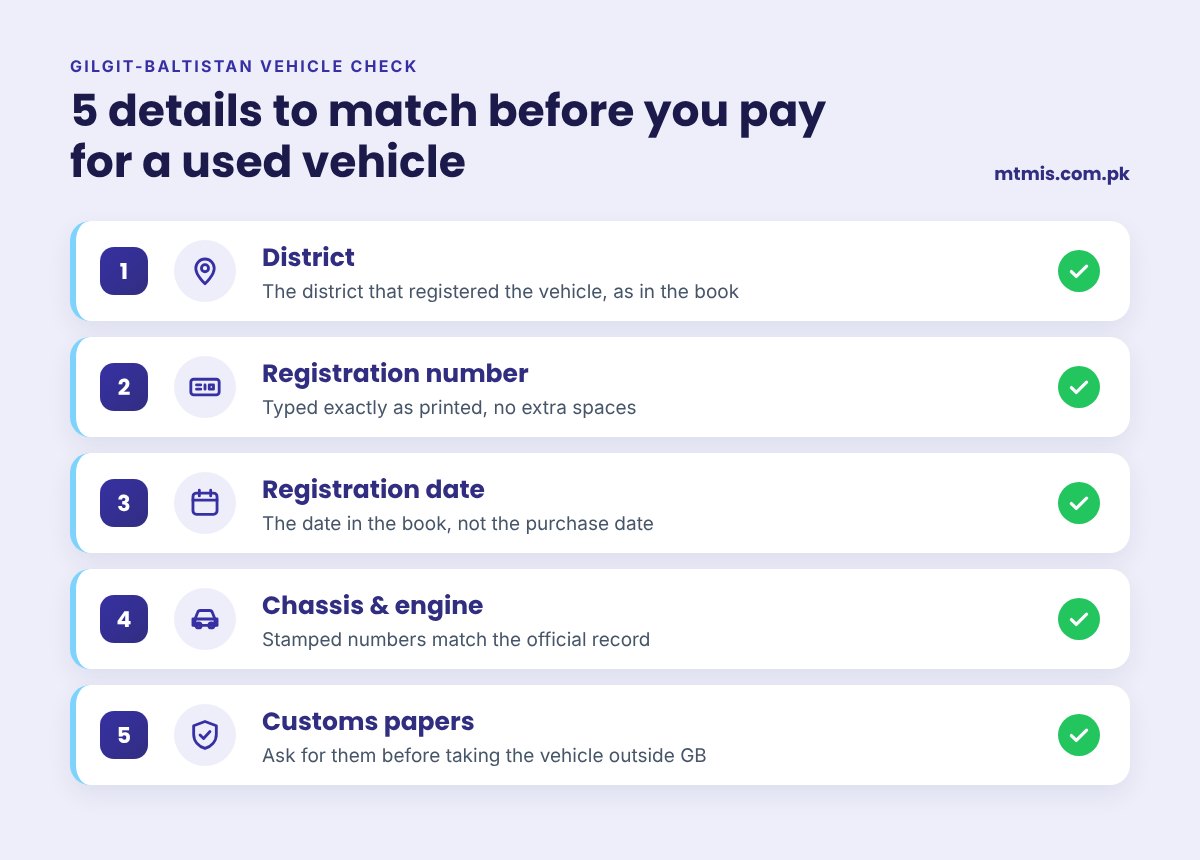
- The district, number and date you entered all match the registration book
- The chassis number on the frame matches the official record
- The engine number on the block matches the official record
- The seller is the owner on record, or holds valid transfer papers
- Make, model and colour match the vehicle you're inspecting
If you plan to take a vehicle outside GB, ask for its customs papers and confirm the current position with Excise and Customs before you pay.
Red Flags a GB Vehicle Verification Can Catch
Most risky deals in Gilgit-Baltistan look normal until you compare the paperwork. A quick GB vehicle verification, done before you hand over any money, exposes the common problems below.
| What you notice | What it may mean | What to do |
|---|---|---|
| The seller won't share the registration date | The seller can't, or won't, let you run the check | Treat it as a warning and insist on seeing the book |
| No record found after careful re-checks | A paper-only file, or no registration at all | Ask the district Excise office to search the file |
| Owner name differs from the seller | Open-letter sale through a middleman | Deal with the registered owner, or walk away |
| Chassis or engine number doesn't match | Tampering, or a part change nobody recorded | Stop the deal until the record matches the vehicle |
| Price far below the market | A non-custom-paid or disputed vehicle | Ask for customs papers and confirm their status |
| Commercial van with no valid permit | An expired or cancelled route permit | Run a route permit search before you agree a price |
Buying from another city? Ask for photos of the book pages that show the district and date, and run the search yourself before you travel. The road to Skardu or Hunza can take a full day, so a two-minute check can save you a wasted journey.
GB Token Tax and Other Excise Services
The department's website says it currently collects token tax, and motor vehicle registration works in all districts of GB. To pay, visit the Excise office of your registering district and keep the receipt with your registration book.
There's also a newer service worth knowing about. In September 2026, the department pointed vehicle owners to an eligibility check for the PM Fuel Subsidy programme. Eligibility depends on the vehicle record, which is one more reason to keep the registration in your own name.
GB Districts on the Verification Portal
The vehicle search lists ten registration districts. Pick the one printed in the registration book, even if the vehicle now runs somewhere else.
| Division | Districts on the portal |
|---|---|
| Gilgit | Gilgit, Hunza, Nagar, Ghizer |
| Baltistan | Skardu, Shigar, Kharmang, Ghanche |
| Diamer-Astore | Diamer, Astore |
Gilgit-Baltistan has created newer administrative districts in recent years, but the portal doesn't list them separately. So if your area became a new district, choose the original district office that issued the registration.
GB Vehicle Verification Shows "No Record Found"? Fix It
This message usually points to a mismatch, not a missing car. Since the search needs three exact matches, a single wrong field returns nothing. Work through these checks in order:
- Confirm the district matches the one in the registration book.
- Retype the registration number without extra spaces.
- Re-enter the registration date exactly as the book shows it.
- Try again later if the page loads slowly or times out.
If every field checks out and you still see no record, the file may predate computerisation. In that case, contact the Excise office of the registering district with the registration book and the owner's CNIC.
Contact the GB Excise and Taxation Department
| Contact | Details |
|---|---|
| Head office | Department of Excise and Taxation, near Commissioner Office, Jutial, Gilgit |
| Phone | (05811) 920990, 920393 |
| admin@gbexcise.gov.pk | |
| Website | gbexcise.gov.pk |
Verify Vehicles in Other Provinces
The GB portal only covers vehicles registered in Gilgit-Baltistan. If the vehicle carries Islamabad plates, use our MTMIS Islamabad guide. For a car registered in Khyber Pakhtunkhwa, the KPK vehicle verification page explains that province's system. You'll find every region on the MTMIS homepage.
FAQs About GB Vehicle Verification
01Is GB vehicle verification free?
Yes. The Excise and Taxation Department of Gilgit-Baltistan doesn't charge for the online search, and you don't need to log in. You only pay for services such as token tax, transfers or new plates.
02Why does the GB portal ask for the registration date?
The date works as a second key alongside the number. As a result, people who only know a plate number can't open someone's record. Find the date in the registration book.
03Can I do GB vehicle verification without the registration date?
No. The vehicle search won't run without all three fields: district, number and date. If you're buying, ask the seller for a photo of the registration book. If you've lost the book yourself, visit your district Excise office.
04Can I do Gilgit-Baltistan vehicle verification by CNIC?
The public portal doesn't offer a CNIC search. It works with the district, registration number and registration date. For a record linked to your CNIC, contact the Excise office of your registering district.
05How do I verify a route permit in Gilgit-Baltistan?
Open the same portal and choose Route Permit Search. Select the district, then enter the vehicle number or the permit number. The result shows the permit's status, route and validity.
06Why does it say "no vehicle record found"?
Usually one of the three fields doesn't match: the district, the number or the date. Recheck each one against the registration book. If the problem continues, the file may still be on paper, so contact the district Excise office.
07Does GB vehicle verification work for Punjab or Islamabad cars?
No. The portal only covers vehicles registered in Gilgit-Baltistan. For other regions, use our MTMIS Punjab or MTMIS Islamabad guides.
08Where do I pay token tax in Gilgit-Baltistan?
Pay at the Excise office of the district that registered your vehicle, and keep the receipt with your registration book. For questions, call the head office in Gilgit on (05811) 920990.
Last reviewed: October 2026, against the GB Excise and Taxation website and its Vehicle and Route Permit Verification Portal.
Disclaimer: MTMIS.com.pk is an independent guide and has no link with the Government of Gilgit-Baltistan. Records and services belong to the Excise and Taxation Department, so confirm anything critical with your district office.